
Our support pages have been provided in English, to translate to your desired language you can use the built-in translate function in Chrome or Firefox.
Multiple Warehouses
The normal warehouse approach is to assign a single warehouse to a customer or catalog. The inventory displayed to the buyer is based on that warehouse assignment.
Using multiple warehouses allows you to define the warehouse at the product level.
For each style, you define a list of warehouses for each warehouse group. This allows a buyer to toggle between multiple warehouse options and select product from any warehouse with availability.
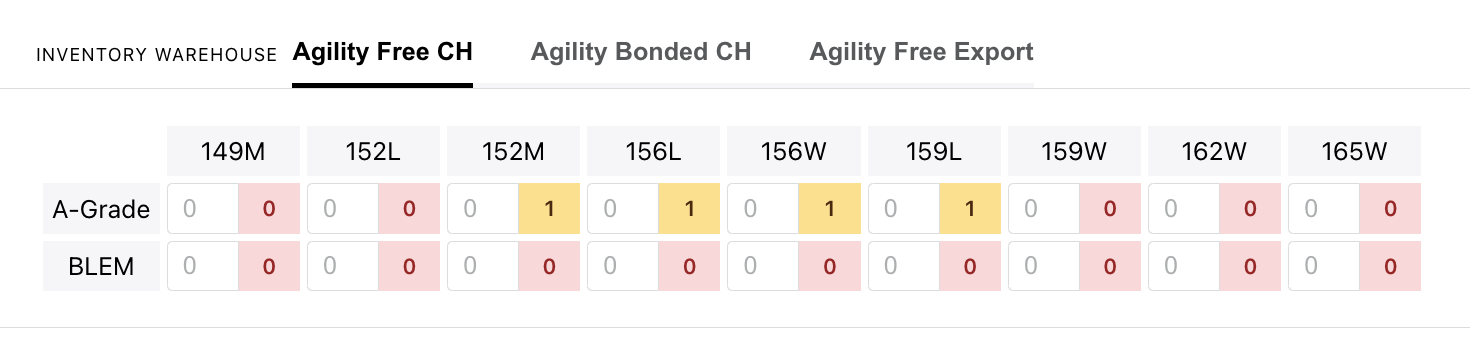
Two additional data feeds are required to implement this
warehouses.csv
| field | required | type | usage |
| warehouse | Y | string | The warehouse 'key' that maps to a specific product. |
| warehouse name | Y | string | The warehouse name that will display on the site |
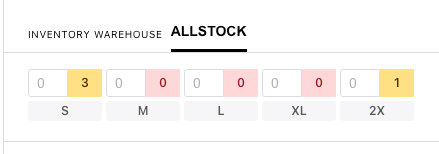
If my warehouse name is 'ALLSTOCK' that name will display on the front end of the site like this:
product_warehouses.csv
| field | required | type | usage |
| WarehouseGroup | Y | string | Maps the 'set' of warehouses to a customer |
| ItemNumber | Y | string | Maps to an item at the COLOR level |
| Warehouse | Y | string | Maps to one or more inventory allocations in the inventory feed. The first warehouse in the list will be considered primary. All others are treated as 'alternates'. |
If my customer warehouse is set to 'COASTAL' I will see availability from both the 'LBC' and 'NYC' warehouses. I will be able to toggle between each warehouse for the STYLE21 product.

Caveats:
- When Exporting Availability, only the PRIMARY warehouse will be used
- When hovering for Availability, only the PRIMARY warehouse will be used